
Meal Planner & Grocery List
JoJo Apps: Meal Planner and Shopping ListFood & Drink
4.5679.00 Reviews
- Version
- 5.45.8
- Installs
- 1.00M
- Age Rating
- Everyone
Screenshots

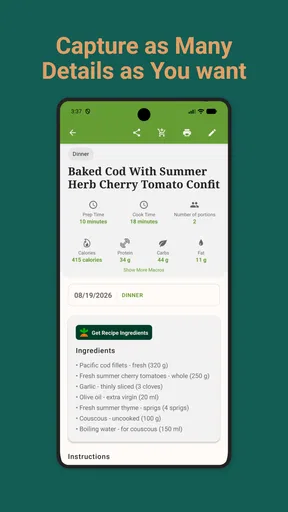
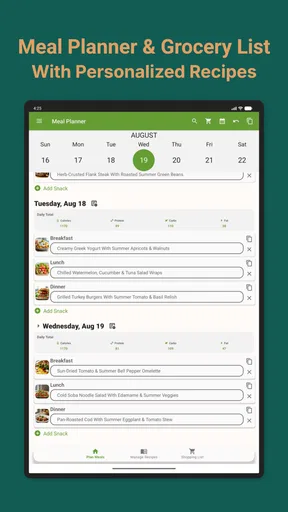
Our Review of Meal Planner & Grocery List
 Analysis by Appyee
Have you ever found yourself staring blankly at your fridge, wondering what to whip up for dinner? If you’re like me, managing meals for the week can be a bit of a headache. Enter the Meal Planner & Grocery List app, a nifty tool designed to streamline your meal planning and grocery shopping experience. I’ve been using it for a couple of weeks now, and I’m here to share my thoughts on this app that promises to make life a little bit easier.
Getting Started with Ease
From the moment you download the Meal Planner & Grocery List app, the user-friendly interface stands out. Setting it up was a breeze. You start by entering your dietary preferences and any restrictions you might have. Whether you’re vegan, keto, or just looking for low-carb options, the app has got you covered. It really feels like the developers put a lot of thought into making it inclusive for all types of eaters.
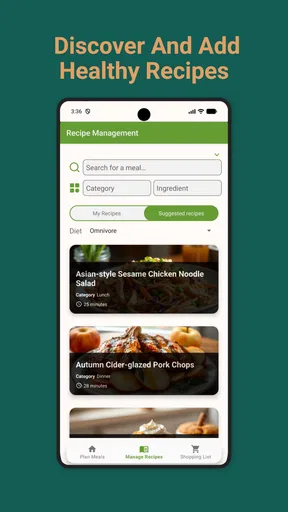
Once your preferences are set, you can dive straight into planning your meals. The app offers a variety of recipe suggestions based on your inputs, which is both a time-saver and a source of culinary inspiration. I’ve discovered some new favorite recipes that I would have never thought to try otherwise!
Seamless Meal Planning
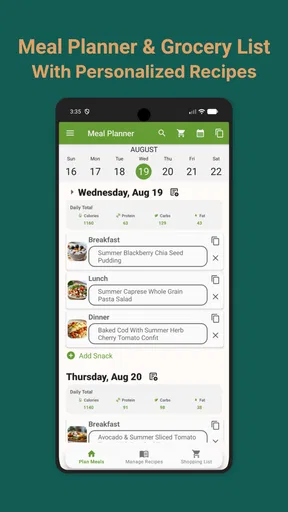
One of the standout features is the meal plan calendar. It lets you drag and drop recipes into your weekly schedule, making it visually appealing and super easy to organize. You can plan meals for the entire week or just a few days ahead, giving you the flexibility to mix things up as you go.
If you’re someone who likes to batch cook or prep meals in advance, this app is a game changer. It gives you the option to scale recipes up or down depending on how many servings you need. No more mental math trying to figure out how many ingredients you need for a family of five!
The Grocery List Revolution
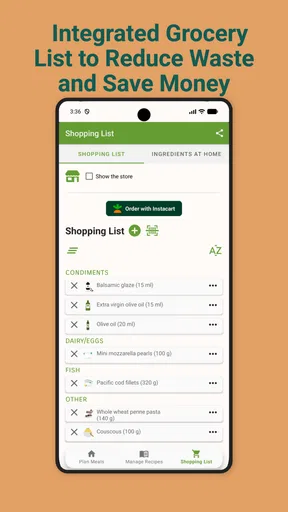
Now, let’s talk about the grocery list feature. It’s honestly one of my favorite parts of the app. As you add recipes to your meal plan, the app automatically generates a grocery list for you. It categorizes items by aisle, which makes shopping so much quicker. You can also manually add or remove items, ensuring you don’t forget that crucial ingredient.
There’s also a handy feature that allows you to check off items as you shop, which means no more fumbling with paper lists or forgetting what you’ve already tossed into your cart. Plus, if you’re sharing the shopping duties, you can share the list with someone else through the app. It’s like having a personal assistant for your grocery runs!
Integration and Customization
Another aspect I appreciate is how the app integrates with other tools. For instance, you can sync it with your calendar app, so you’ll get reminders about meal prep or when ingredients are about to expire. This is particularly useful for someone like me, who tends to forget things in the back of the fridge until they’re well past their prime.
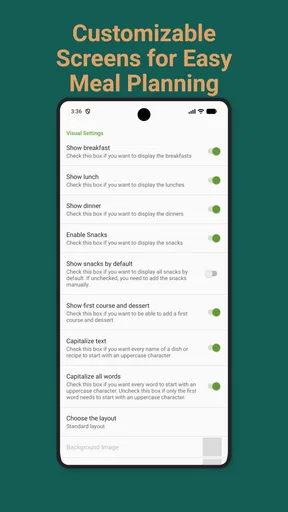
Customization is also a big selling point. You’re not locked into just using the recipes provided by the app. You can import your own recipes and even tweak existing ones. This means you can keep your grandma’s famous lasagna recipe on hand without having to switch apps.
Making the Routine Work for You
The best way I’ve found to use the planner is to start with the week’s constraints, rather than trying to fill every calendar slot. I might choose a couple of recipes, leave a night open for leftovers, and keep another meal flexible for a late workday. That makes the plan feel useful instead of like another schedule I have to obey. The ability to plan only a few days ahead is especially valuable when my week is unpredictable.
Recipe scaling can also do more than adjust portions for a large family. If I’m cooking for one or two, scaling down helps avoid a fridge full of food I won’t finish; scaling up can make a planned dinner serve as lunch the next day. I still check quantities before shopping, because household appetites and package sizes do not always line up neatly. Treating the generated list as a solid first draft, rather than an unquestionable order, is a practical habit.
For a realistic Sunday routine, I can pick meals for the busy evenings, add one of my saved recipes, and let the list gather the ingredients. Before heading out, I can review it and remove anything already in the pantry, then check items off as I shop. That last review matters: the app can organize what a recipe calls for, but I’m the one who knows whether there is already rice or oil at home. This small pause helps prevent duplicate purchases and makes the list work better for a real kitchen.
Readability, Navigation, and Different Ways of Using It
The calendar-and-list approach gives the app a clear purpose: plan meals, then turn those choices into a shopping task. I find that more approachable than keeping recipes, meal notes, and groceries scattered across separate apps or scraps of paper. The aisle grouping is useful once I’m in a shop, while the calendar helps me think ahead at home. These are different jobs, and having both in one place makes the routine easier to follow.
That said, a visual calendar is most helpful if you like seeing the week laid out. Someone who prefers a plain checklist or wants to type a quick dinner note without choosing a recipe may find the planning structure more involved than necessary. I’d suggest trying a short plan first, rather than committing to a full week. It gives you a chance to see whether moving recipes around suits the way you think about meals.
The app is listed for everyone and works on Android devices running version 6.0 or later. It is free to download, with optional in-app purchases ranging from $0.49 to $19.99 per item. Its current version is 5.40.6, and JoJo Apps: Meal Planner and Shopping List is the developer. Those details make it easy to judge the basic fit, but I’d still begin with the free experience and decide whether any paid extras would solve a need I actually have.
Shopping Together and Sensory or Motor Needs
A shared list is particularly handy when one person plans meals and another does the shopping. Instead of sending a separate message with ingredients, I can share the list and let the other person check things off while moving through the store. It also reduces the familiar confusion of two people buying the same item. For a household, agreeing on who edits the list and who checks items off can make this workflow smoother.
There are useful trade-offs for people with different motor or sensory preferences. Checking items off on a phone can be easier than holding a paper list while pushing a cart, but it still depends on being comfortable using a touchscreen in a busy place. If tapping or reading a screen while shopping is tiring, preparing the list at home and using it in shorter visits may feel better. I would not assume every task is effortless for every person: the app’s value depends partly on how comfortable its calendar and list are for you to navigate.
Meal planning can also support changing routines without requiring a strict diet. Dietary preferences and restrictions help shape recipe suggestions, but I’d still read each recipe carefully and use my own judgment about ingredients. Preferences are a starting point, not a substitute for checking whether a particular meal suits an individual need. For someone managing food choices closely, keeping trusted personal recipes alongside suggested ones may be a more dependable approach.
How It Compares and Where It Can Fall Short
Compared with a general notes app or a paper list, this app connects planned meals with the ingredients needed to make them. That can save repeated copying and make it easier to see the link between dinner plans and a shopping trip. A dedicated recipe collection, on the other hand, may be better for someone whose main goal is discovering and organizing cooking ideas rather than scheduling meals. The right choice depends on whether planning and grocery coordination are the problem you want to solve.
The recipe database is not exhaustive, and that limitation matters if you cook from a particular cuisine, follow a very specific food routine, or rely on a narrow set of trusted dishes. Importing your own recipes and adjusting existing ones helps, but it takes some effort to build a personal collection. I’d treat the app as a useful organizer, not as a guarantee that it will already contain every meal you want to cook.
There is also a difference between downloading the app for free and deciding whether its paid options are worthwhile. The app has optional purchases, so I would check what is included before paying and compare those extras with how often I actually plan meals. Someone who only needs a simple shared grocery checklist may not get enough value from a fuller planning setup. A household that regularly coordinates meals, portions, and shopping may find the combined workflow more worthwhile.
The Downsides
Of course, no app is perfect. The recipe database, while extensive, isn’t exhaustive. Occasionally, I’ve found myself searching for a specific dish that isn’t there. However, given the ability to add your own recipes, this isn’t a deal-breaker for me.
Another point worth mentioning is that while the app is free to download, there are premium features that require a subscription. These include advanced meal planning features and exclusive recipes. If you’re a serious home cook, you might find these features worth the investment, but casual users might be content sticking with the free version.
Who I’d Recommend It To
I’d recommend this app to people who regularly ask themselves what to cook, want to coordinate groceries with planned meals, or need a manageable way to organize recipes for different preferences. It is also a reasonable fit for families and shared households: scaling portions and sharing the shopping list can reduce the number of decisions and messages involved in getting dinner on the table.
I’d be less likely to recommend it to someone who already has a meal system they enjoy, wants only a quick grocery checklist, or expects a recipe database to cover every specific dish. It may also feel like unnecessary structure if you prefer to decide what to eat spontaneously each day. A notes app or paper list is perfectly adequate when all you need is a few items, while this planner makes more sense when meal choices and shopping are connected problems.
The app has an average rating of 4.6 from around 21,000 ratings, with more than 1 million installs. That suggests it has found an audience, though popularity alone would not decide it for me. I’d judge it by whether the calendar, recipe handling, and shared list fit my own routine. If you try it, a small plan for the next few dinners is a better test than entering your whole recipe collection on day one.
Final Thoughts
All in all, the Meal Planner & Grocery List app has been a fantastic addition to my daily routine. It takes the stress out of meal planning and makes grocery shopping more efficient and less of a chore. If you’re looking to streamline your meal prep and spend less time in the kitchen, this app is definitely worth checking out.
Whether you’re a seasoned chef or someone who dreads the daily question of "What’s for dinner?", this app offers something for everyone. Give it a try, and you might find that meal planning becomes a part of your week you actually look forward to.
Verdict
Strengths of Meal Planner & Grocery List
- User-friendly interface, easy to navigate.
- Customizable meal plans to suit diets.
- Syncs with grocery store discounts.
- Supports multiple dietary preferences.
- Offline access for planning on the go.
Limitations of Meal Planner & Grocery List
- Limited recipe database initially.
- Some features require premium upgrade.
- Occasional syncing issues with accounts.
- No integration with voice assistants.
- Ads can be intrusive in free version.
Similar Picks in This Category
View All
Rappi: Food Delivery, Grocery
Rappi, Inc - Delivery3.5

McDonald’s: Cupons e Delivery
Arcos Dorados4.3

Swiggy: Food Instamart Dineout
Swiggy4.7

Blinkit: Groceries & more
Blinkit4.8

foodpanda: food & groceries
Foodpanda GmbH a subsidiary of Delivery Hero SE4.0

Zomato: Food Delivery & Dining
Zomato4.7
Frequently Asked Questions
What features does the Meal Planner & Grocery List app offer?
The Meal Planner & Grocery List app provides a variety of features to streamline your meal planning process. It includes customizable meal plans, a comprehensive grocery list generator, and nutritional information for meals. Users can also save their favorite recipes and set reminders for meal prep and grocery shopping.
Is the Meal Planner & Grocery List app user-friendly for beginners?
Yes, the app is designed with a user-friendly interface, making it suitable for beginners. It offers step-by-step guides, intuitive navigation, and helpful tips to assist new users in efficiently planning meals and creating grocery lists. The app also includes tutorial videos for additional support.
Can I sync the app across multiple devices?
Absolutely, the Meal Planner & Grocery List app allows you to sync your data across multiple devices. This means you can access your meal plans and grocery lists from your smartphone, tablet, or computer, ensuring you always have the information you need at your fingertips, whether at home or on the go.
Does the app support dietary preferences and restrictions?
Yes, the app supports various dietary preferences and restrictions. Users can filter recipes and meal plans based on specific needs such as vegan, vegetarian, gluten-free, or low-carb diets. This flexibility ensures that you can tailor meal plans to suit your health requirements and personal tastes.
Is there a cost associated with using the Meal Planner & Grocery List app?
The app offers a free version with basic features, but for access to premium features, users can opt for a subscription. The premium version includes advanced meal planning tools, exclusive recipes, and ad-free browsing. Pricing details are available within the app store where the app is downloaded.
